Courses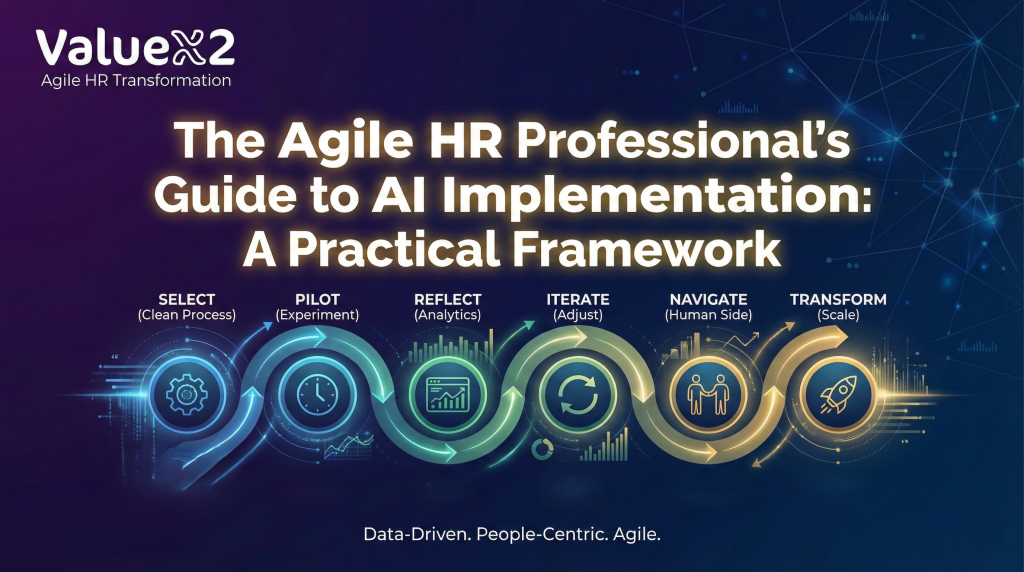
A Practical Framework for Turning AI Hype into Measurable HR Outcomes
HR leaders aren’t asking “How do we use AI?” — they’re asking “How do we get real, proven value from AI in HR without damaging trust, culture or jobs?” This article answers that question with a practical, evidence‑based framework that shows you how to move from activity and pilots to measurable business outcomes. It introduces the S.P.R.I.N.T. approach — Select, Pilot, Reflect, Iterate, Navigate, Transform — combining Agile ways of working, HR analytics and the latest CHRO research to help you design AI use cases that start small, avoid “AI workslop”, protect employee wellbeing and scale only what the data proves is working. By the end, you’ll know exactly where to start, which HR processes to prioritise, how to measure impact, and how to build the skills and governance your HR function needs to turn AI from hype into sustainable value.
Three months ago, I sat across from a Senior HR Business Partner at an insurance company with over 1,000 employees. She had a 2.4 million budget approved for AI in HR. The board wanted results in 90 days. Her team was excited. The vendors were lined up. And she was terrified.
“Sagar,” she said, “I’ve seen what happens when we roll out technology without thinking about the people. We spent 800K on an HRIS upgrade three years ago that half the team still won’t use properly. How do I make sure AI doesn’t become another expensive mistake?”
This conversation happens more often than you’d think. In my 17 years of helping organizations transform their HR functions, I’ve learned that the companies succeeding with AI in HR aren’t the ones with the biggest budgets or the flashiest tools. They’re the ones applying the same principles that make Agile HR transformations work: start small, measure everything, learn fast, and put people at the center.
The organizations that get this right have something in common: they’ve built HR analytics capabilities alongside their AI initiatives. They don’t just implement tools — they measure impact, iterate based on data, and make decisions grounded in evidence rather than vendor promises.
That’s exactly where HR finds itself in 2026. Gartner’s latest CHRO Guide on 9 Future of Work Trends warns that “AI workslop” — fast but poor‑quality AI output riddled with hidden errors — has become one of the biggest productivity drains, taking nearly two hours per incident to detect and fix. At the same time, culture is under pressure as organizations ask employees to deliver more in AI‑driven environments without always being clear about the trade‑offs or support they’ll provide. HR is being asked to deliver AI‑powered efficiency and innovation, while also protecting trust, culture, and mental fitness in the human–machine era.
In other words: the stakes have never been higher, and “just buying AI tools” has never been more dangerous.
The Question Keeping HR Leaders Awake at Night
“How do we implement AI in HR in a way that actually delivers value — without breaking our people, our processes, or our culture?”
Let me share a pattern I’ve observed repeatedly.
The Typical Failed Approach
-
Executive reads about AI in Harvard Business Review.
-
Committee selects an AI tool after vendor demos.
-
Company‑wide rollout announced with great fanfare.
-
Six months later: low adoption, frustrated employees, wasted budget — and no data on what actually happened.
This pattern now shows up in most AI reports too. Many organizations race into pilots with generic GenAI tools, but they don’t connect use cases to real business outcomes or redesign the underlying work. AI ends up bolted onto legacy workflows that were never designed to be transparent, adaptive, or “agent‑ready”, so it simply amplifies noise instead of value.
The Agile Approach to AI Implementation in HR
-
Identify a specific pain point in one HR process.
-
Establish baseline metrics and analytics capabilities.
-
Run a 4‑week pilot with one team.
-
Gather feedback, analyze data, iterate, improve.
-
Scale what the analytics prove is working, discard what isn’t.
The difference isn’t the technology. It’s the discipline of measurement and the willingness to let data guide decisions.
Research from Sapient Insights Group (2024) confirms what I’ve seen in practice: organizations using adaptive, Agile‑inspired change management are twice as likely to exceed implementation expectations as those using traditional rollout methods. And the organizations in that successful group? They all had one thing in common — they measured everything.
Why Most AI in HR Implementations Fail (And How to Avoid It)
It’s tempting to think AI will “fix” broken HR processes. It won’t.
Gartner calls out a core problem: employers are unintentionally incentivizing speed over quality, leading to AI “workslop” that erodes productivity and trust. HR teams implement tools that generate more output, but because nobody has redesigned the process or clarified quality standards, managers spend more time cleaning up AI‑generated mess than they ever saved. At the same time, many CEOs are already planning AI‑linked headcount reductions — despite the fact that most current AI investments do not yet deliver productivity gains that justify restructuring.
Underneath the hype, the real reasons AI in HR fails are:
-
No clear business problem or outcome.
-
No analytics baseline.
-
No process clean‑up.
-
No governance or safeguards around ethics, bias, and mental fitness.
-
No serious investment in frontline and manager capability.
When you fix those, AI in HR stops being a shiny experiment and starts becoming part of how work actually gets done.
The way I like to tell mu clients how AI, Agile and Analytics work together is:
• AI without Agile → automates poor decisions at scale
• Analytics without Agile → produces reports with no behavior change
• Agile without AI & Analytics → relies on intuition that does not scale
The S.P.R.I.N.T. Framework
5 Steps to Implement AI in HR Using Agile Principles
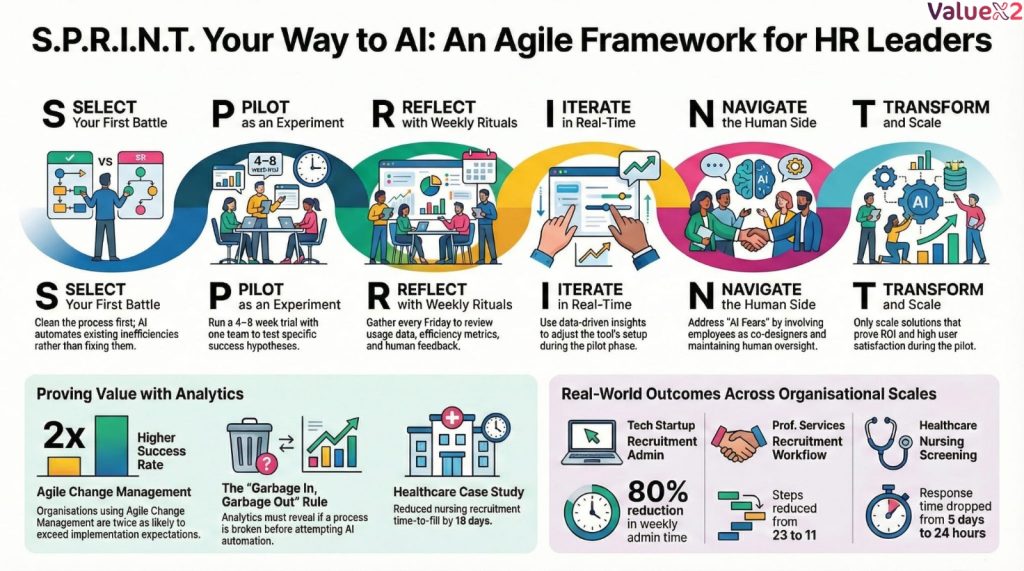
After guiding dozens of organizations through this journey, I’ve developed a practical framework I call S.P.R.I.N.T. — because that’s exactly what this is: a series of focused iterations driven by data and analytics rather than a marathon deployment based on assumptions.
-
S — SELECT: Choose your first AI battle wisely (and clean up first).
-
P — PILOT: Run a true experiment with analytics at the center.
-
R — REFLECT: Gather intelligence, analytics, and human insight.
-
I — ITERATE: Make data‑driven adjustments in real time.
-
N — NAVIGATE: Use analytics to manage the human side of change.
-
T — TRANSFORM: Scale what the analytics prove is working.
Let’s walk through each step — and connect it with what leading research is telling CHROs and HR Business Partners in 2026.
S — SELECT: Choose Your First AI Battle Wisely (and Clean Up First)
The mistake: starting with the most complex process or the one your CEO is asking about — or worse, rushing to buy a tool without fixing the process first.
The better approach: before you even look at AI tools, clean up the process and establish your analytics baseline.
Here’s a hard truth I’ve learned: garbage in, garbage out. AI doesn’t fix broken processes — it automates them. If your current process is inefficient, convoluted, or full of unnecessary steps, AI will simply make those problems happen faster. And without analytics, you’ll never know if it’s working.
Step 1: Establish Your Analytics Baseline
Before changing anything, you need to know where you stand. For any process you’re considering, document:
-
Time metrics: How long does each step take? What’s the total cycle time?
-
Volume metrics: How many transactions per week or month?
-
Quality metrics: Error rates, rework required, complaints received.
-
Cost metrics: Labor hours, external costs, opportunity costs.
-
Experience metrics: User satisfaction, candidate NPS, employee feedback.
I worked with a manufacturing company that wanted AI for their recruitment process. When we dug into their analytics, we discovered their time‑to‑hire metric was masking a huge problem: 60% of that time was spent waiting for manager feedback on candidates. The AI tool they were considering wouldn’t have fixed that at all. We fixed the approval workflow first, then added AI for scheduling. Result: 52% improvement in time‑to‑hire — and we could prove it with data.
This mindset aligns with Gartner’s conclusion that “process pros, not tech prodigies, unlock AI value.” The teams extracting real ROI from AI are the ones that redesign entire workflows — clarifying decision rights, handoffs, and quality criteria — rather than hoping a tool will magically compensate for structural problems.
Step 2: Process Review — Remove the Waste First
With your baseline established, map your current process and ask:
-
Which steps add value? Which are pure waste?
-
Where do handoffs create delays?
-
What workarounds have people created to get things done?
-
If you were designing this process from scratch, what would you eliminate?
Step 3: Look for These Three Criteria
In your cleaned‑up process, look for:
-
High pain, low complexity.
- Example: Interview scheduling that consumes 12+ hours per week
- Not: Performance management overhaul affecting 10,000 employees
-
Measurability (before and after).
- Can you quantify the current state? (Time spent, error rates, satisfaction scores)
- Will you be able to measure improvement?
-
Willing participants.
- Which team is actually asking for help?
- Who has bandwidth to engage with a pilot?
Real example: a healthcare company I worked with wanted to implement AI across their entire talent acquisition function. We started with one thing: automating the initial screening of nursing applications. Recruiters were drowning in 400 applications per posting. Within three weeks, we reduced screening time by 60% and improved candidate response time from five days to 24 hours — and we had the analytics to prove it. That success created the momentum and proof of concept to expand thoughtfully. I will be writing on how to select AI tools and some AI tools I feel that will help achieve this next.
P — PILOT: Run a True Experiment with Analytics at the Center
The mistake: treating the pilot as a soft launch of the final solution, without clear metrics.
The better approach: design a genuine experiment with clear hypotheses and a robust analytics plan.
Your Pilot Canvas
| Element | What to define |
|---|---|
| Hypothesis | If we implement AI tool X for process Y, then metric Z will improve by X%. |
| Duration | 4–8 weeks maximum. |
| Scope | One team, one location, one process. |
| Success metrics | Quantitative (time saved, accuracy), qualitative (user satisfaction). |
| Analytics plan | How will you collect data? Who will analyze it? How often? |
| Failure criteria | When do we stop? |
Critical success factor: the pilot team must have real decision‑making power. If they hate the tool but are forced to use it, you’re not running a pilot — you’re running a rollout with extra steps.
What I tell my clients: design your pilot to fail fast and cheap — and make sure your analytics can tell you whether it’s failing or succeeding within the first two weeks. If the tool isn’t working, you want to know in week two, not month nine.
This “experiment” lens is exactly what David Green urges in his “12 Opportunities for HR in 2026” — shifting people analytics from backward‑looking reporting to an enterprise “intelligence system” that can run experiments at pace and guide decisions in real time. Rather than launching another dashboard, HR should be using data to test hypotheses about where AI actually improves work quality, decision velocity, and employee experience.
R — REFLECT: Gather Intelligence, Analytics, and Human Insight
The mistake: focusing only on quantitative metrics and missing the human story — or worse, ignoring the data entirely.
The better approach: collect three types of feedback and analyze them together.
-
Usage data (the what)
-
How often is the tool being used?
-
Which features are most/least used?
-
Where do users drop off?
- Analytics insight: Look for patterns in usage by time of day, user type, or task complexity
-
-
Efficiency metrics (the impact)
-
Time saved per transaction.
-
Error rates — did they improve or worsen?
-
Throughput improvements.
- Analytics insight: Calculate ROI in real dollars and hours
-
-
Human feedback (the why)
-
What do users love?
-
What’s frustrating?
-
What workarounds have they created?
-
How has their job changed?
- Analytics insight: Correlate satisfaction scores with usage patterns
-
The Weekly Reflection Ritual:
Every Friday during your pilot, gather the team for 30 minutes. Review the week’s analytics together and ask:
-
What do the numbers tell us worked well this week?
-
What patterns are we seeing that concern us?
-
Based on the data, what should we try differently next week?
Document everything. I’ve seen teams discover that a “failed” pilot actually revealed a process problem that had nothing to do with the AI tool — saving them from blaming the wrong thing. The analytics told the true story.
This kind of reflection also helps prevent what Gartner calls “AI’s biggest hidden cost”: the mental fitness impact of prolonged, uncritical AI use. When employees are under pressure to use AI constantly, without time to question or refine outputs, they are more likely to experience cognitive overload and degraded performance. Building space for reflection, discussion of pain points, and adjustments to usage patterns is not a “nice‑to‑have” — it’s a risk‑mitigation strategy.
I — ITERATE: Make Data‑Driven Adjustments in Real Time
The mistake: waiting for the pilot to end before making changes, or making changes based on gut feeling rather than data.
The better approach: treat the pilot as a living experiment where analytics drive every decision.
Examples from real implementations:
| Original Setup | Analytics Insight | Iteration Made | Result |
| AI screening tool with auto-rejection | Usage dropped 40% in week 2; recruiters bypassing the tool | Added “review queue” for borderline candidates | Usage recovered to 95%; satisfaction improved |
| Chatbot answering all HR questions | 35% of queries being escalated to humans; sentiment analysis showed frustration | Routed emotional/complex queries to HR Business Partners | Escalation dropped to 12%; satisfaction increased |
| AI-generated performance feedback | Managers editing 90% of AI drafts; time savings minimal | AI drafts → Manager edits → Employee receives | Manager time reduced 30%; quality improved |
| Automated onboarding emails | Open rates declining week-over-week; analytics showed email fatigue | Reduced to 5 key touchpoints, spaced over 30 days | Open rates increased 45%; completion rates improved |
The principle: your first implementation is never your best implementation. Build iteration into the process from day one — and let your analytics tell you what to iterate on.
This is where the “operating model” conversation becomes real. As David Green notes, the real opportunity is not to sprinkle AI across existing tasks, but to redesign the way work flows between humans and agents — clarifying where AI drafts, where humans decide, and how both sides learn over time. Iteration is how you move from scattered tools to a coherent human–AI operating system.
N — NAVIGATE: Use Analytics to Manage the Human Side of Change
The mistake: assuming that if the tool works, people will use it — without tracking adoption and sentiment.
The better approach: proactively address the human concerns that kill adoption, using analytics to spot problems early.
The Four Fears of AI in HR (And How Analytics Helps Address Them):
Fear 1: “AI Will Replace Me”
- Reality: 75% of HR professionals agree AI will heighten the value of human judgment (SHRM, 2024)
- Your Message: “AI handles routine tasks so you can focus on strategic, high-value work”
- Action: Redefine roles before implementing tools. Show the career path forward.
- Analytics to track: Time allocation before/after (are people doing more strategic work?), skill development metrics, internal mobility rates
Fear 2: “I Don’t Trust AI Decisions”
- Reality: Bias in AI is a real concern that requires active management
- Your Message: “We maintain human oversight. AI provides insights; humans make decisions”
- Action: Build in review checkpoints. Be transparent about how AI makes recommendations.
- Analytics to track: Override rates (how often do humans disagree with AI?), decision quality metrics, bias audits
Fear 3: “This Will Make My Job Harder”
- Reality: Poorly implemented AI often creates more work initially
- Your Message: “We’re iterating based on your feedback and the data to make this genuinely helpful”
- Action: Involve users in design. Fix pain points quickly. Celebrate early wins.
- Analytics to track: Time-per-task before/after, error rates, user satisfaction scores, support ticket volume
Fear 4: “My Data Isn’t Safe”
- Reality: Privacy concerns are valid and must be addressed
- Your Message: “We’ve implemented specific safeguards. Here’s exactly how your data is used”
- Action: Be specific about data handling. Don’t hide behind generic privacy policies.
- Analytics to track: Data access logs, compliance metrics, privacy-related support tickets
A story from the field: I once worked with a recruitment team where three senior recruiters were openly hostile to an AI screening tool. The analytics told an interesting story: they were spending four hours per day on manual screening, but their override rate on AI recommendations was 78%. Instead of forcing adoption, we made them co‑designers. We used their override data to train the AI better. Within two months, their override rate dropped to 23%, and they were training new team members on the tool.
This “people side” is non‑negotiable. Culture is already under strain as organizations quietly raise performance expectations without updating the social contract, and AI is now a key part of that tension. CHROs who are explicit about how AI will change roles, workloads, and expectations — and who use evidence to monitor well‑being and trust — will protect both performance and employment brand.
T — TRANSFORM: Scale What the Analytics Prove Is Working
The mistake: scaling everything because “we invested so much” — without data to justify it.
The better approach: be ruthless about what deserves to scale, based on your analytics.
A simple scaling decision matrix might look like this:
| Tool / process | User satisfaction | Efficiency gain | Analytics confidence | Decision |
|---|---|---|---|---|
| AI interview scheduling | 4.5/5 | 60% time saved | High (8 weeks of data) | Scale |
| AI resume screening | 3.2/5 | 40% time saved | Medium (inconsistent) | Iterate |
| AI performance feedback | 2.1/5 | 15% time saved | Low (poor adoption) | Discontinue |
Gartner cautions CHROs about “RIFs before reality”: CEOs pushing AI‑linked headcount cuts before the productivity gains exist to sustain them. The same principle applies to scaling tools. If you don’t have robust, multi‑dimensional evidence (productivity, quality, experience, risk), you’re making high‑impact decisions on wishful thinking. Sometimes the bravest — and most value‑creating — move is to stop, learn, and redirect investment.
Questions to Ask Before Scaling (Answer with Data):
- Did the pilot team genuinely benefit, or were they being polite? (Look at usage analytics, not just surveys)
- Can we replicate the success conditions in other teams? (Analyze what made the pilot successful)
- What’s the total cost of ownership (not just license fees, but training, support, maintenance)? (Calculate full ROI)
- Does this align with our broader HR strategy? (Map to strategic KPIs)
The Hard Truth: Sometimes the best decision is to stop. I’ve seen organizations waste millions scaling tools that never worked because they couldn’t admit the pilot failed. The Agile mindset requires courage to pivot — and analytics give you the confidence to make that call.
Real Results: What This Looks Like in Practice — Organizations of All Sizes
Let me share anonymized results from five organizations I’ve worked with — from a 45-person startup to a 12,000-employee healthcare system. The S.P.R.I.N.T. framework works at every scale, and analytics are the common thread in every success story.
Small Company: Tech Startup (45 employees)
The Challenge:
The founder was spending 8-10 hours per week on interview scheduling and candidate communication. As the company grew from 15 to 45 people, this became unsustainable. They had no dedicated HR person yet — and no analytics capabilities.
What We Did:
- Established baseline analytics: Tracked time spent on recruiting admin for 2 weeks
- Mapped the current process (which was basically the founder’s inbox)
- Identified waste: 60% of time was spent on back-and-forth scheduling emails
- Implemented a simple AI scheduling tool (Calendly with AI-powered routing)
- Set up automated candidate communication templates
- Built a simple dashboard to track time saved and candidate response times
The Results:
- Founder time on recruiting admin: 10 hours → 2 hours per week
- Candidate response time: 3 days → 4 hours
- Cost: $15/month for the tool
- ROI in first month: 240x
- Analytics insight: They could now predict recruiting capacity and plan hiring waves
The Lesson: Small companies can move faster and see dramatic results with minimal investment. The key is starting with the biggest time sink — and building simple analytics from day one so you can prove value.
Mid-Sized Company: Professional Services Firm (340 employees)
The Challenge:
Their recruitment process had grown organically over 10 years. Every partner had their own way of reviewing candidates. The HR team was drowning in manual work, and candidate experience was inconsistent. They had data, but it was scattered across spreadsheets.
What We Did:
- Built an analytics baseline: Consolidated 2 years of recruiting data into a single dashboard
- Process cleanup first: Mapped the entire recruitment workflow and identified 12 steps that added no value
- Consolidated partner review into a single, structured evaluation
- Implemented AI for initial resume screening and scheduling
- Kept human decision-making at the final interview stage
- Established weekly analytics reviews to track progress
The Results:
- Process steps: 23 → 11
- Time-to-offer: 6 weeks → 2.5 weeks
- Candidate satisfaction: 2/5 → 4.6/5
- Recruiter capacity: Freed up 1.5 FTE for strategic work
- Analytics insight: Data revealed that candidates who received responses within 24 hours were 3x more likely to accept offers — this became a key KPI
The Lesson: Mid-sized companies often have the most to gain from process cleanup. Years of organic growth create inefficiencies that AI alone can’t fix. Clean first, then automate — and use analytics to find the hidden insights that drive real improvement.
Large Company: Healthcare System (12,000 employees)
The Challenge:
Nursing recruitment was overwhelmed — 400+ applications per posting, 12-person recruiting team working nights and weekends just to keep up. Turnover was high because they couldn’t hire fast enough. They had an HRIS with reporting, but no one was using the data to drive decisions.
What We Did:
- Established comprehensive analytics: Built a recruiting dashboard tracking 15+ KPIs
- Started with one role: Registered Nurses
- Implemented AI for initial application screening (not auto-rejection — flagging for recruiter review)
- Used AI scheduling to eliminate the back-and-forth
- Kept human recruiters for relationship-building and final decisions
- Created a weekly analytics review with the recruiting team
The Results:
- Screening time per application: 8 minutes → 3 minutes
- Candidate response time: 5 days → 24 hours
- Recruiter overtime: -80%
- Time-to-fill for RNs: 47 days → 28 days
- Analytics insight: Dashboard revealed that candidates from certain sources had 40% higher 1-year retention — this completely changed their sourcing strategy
Scaled to: Full talent acquisition suite over 18 months
Current state: 40% reduction in time-to-fill across all roles, $1.2M annual savings
The Lesson: Large organizations need to start narrow and prove value before scaling. The pilot success — backed by data — created the political capital to expand. And the analytics revealed insights that transformed their strategy beyond just efficiency.
Mid-Sized Company: Financial Services (8,500 employees)
The Challenge:
They wanted to use AI for skills gap analysis and personalized learning recommendations. Sounded perfect on paper. They had invested heavily in an analytics platform.
What Happened:
- Pilot results: 3.1/5 user satisfaction, unclear efficiency gains
- Employees didn’t trust the AI-generated recommendations
- The data feeding the AI was incomplete and outdated
- Analytics revealed the real problem: Only 34% of employee skills were accurately documented in the system
The Decision:
We discontinued the AI tool after iteration didn’t improve outcomes. This wasn’t a failure — it was a valuable lesson, revealed by the analytics.
What We Learned:
The problem wasn’t the AI tool. It was data quality. The organization had never invested in proper skills taxonomy or data governance. The AI was making recommendations based on garbage data — and the analytics made this crystal clear.
What We Did Next:
- Paused the AI initiative
- Invested 6 months in cleaning up skills data and establishing governance
- Built data quality dashboards to monitor ongoing accuracy
- Revisited AI tools with clean data — and saw dramatically better results
The Lesson: Sometimes the right decision is to stop and fix the foundation. AI amplifies whatever you feed it. Feed it garbage, get garbage recommendations. Analytics tell you whether your foundation is solid before you build on it.
Small Company: Boutique Marketing Agency (28 employees)
The Challenge:
The two-person HR team was spending 15+ hours per week answering the same questions: “How do I reset my password?” “What’s our PTO policy?” “When do benefits kick in?” They knew they needed help but thought AI was “too big” for a company their size. They had no formal analytics.
What We Did:
- Established simple analytics: Tracked question types and response times for 2 weeks
- Discovered that 65% of questions were repetitive and easily automated
- Implemented a simple AI-powered HR chatbot integrated with Slack
- Trained it on their employee handbook and common questions
- Set up escalation to the HR team for anything complex or sensitive
- Created a weekly report tracking questions handled, escalation rate, and employee satisfaction
The Results:
- Routine HR questions handled by AI: 65%
- HR team time freed up: 12 hours per week
- Employee satisfaction with HR support: 8/5 → 4.5/5
- Cost: $99/month
- Analytics insight: Data revealed that questions spiked on Mondays and the first day of each month — they adjusted staffing accordingly
The Lesson: Small companies often think AI is only for enterprises. The reality is that AI can be incredibly accessible and cost-effective for smaller teams. And even simple analytics can reveal powerful insights that drive better service.
The AI Tools Landscape: What I’m Seeing Work (And Not Work)
I don’t sell AI tools, and I don’t take commissions from vendors. Here’s my honest assessment based on what I’ve observed across organizations of all sizes:
Tools That Consistently Deliver Value:
| Category | What Works | Why It Works | Best For | Analytics Capability |
| Interview Scheduling | Calendly, GoodTime, Clara | Solves a genuine pain point with minimal change management | All sizes | Built-in reporting on time saved, no-shows |
| Resume Screening | Textio, Phenom, Eightfold (with human oversight) | Reduces volume, but requires careful bias monitoring | 200+ employees | Bias audits, quality metrics, override tracking |
| HR Chatbots | Intercom, Zendesk AI, custom solutions | Handles routine queries, routes complex ones to humans | All sizes | Query analytics, sentiment analysis, escalation rates |
| Skills Analysis | Degreed, Cornerstone Skills Graph, Workday Skills Cloud | Supports L&D strategy when data is clean | 500+ employees | Skills gap analysis, learning path effectiveness |
| Onboarding Automation | Enboarder, Sapling, custom workflows | Improves new hire experience with personalization | 100+ employees | Completion rates, time-to-productivity, engagement scores |
Tools That Require Caution:
| Category | Concerns | My Advice | Best For | Analytics to Watch |
| AI Performance Reviews | Risk of generic feedback, reduced manager-employee connection | Use as drafting assistant, not replacement | Any size (with oversight) | Manager edit rates, employee satisfaction, quality scores |
| Predictive Attrition | Privacy concerns, potential for self-fulfilling prophecies | Be extremely transparent about use | 1000+ employees | Accuracy rates, false positives, ethical audits |
| AI Video Interview Analysis | Bias risks, candidate experience concerns | I generally advise against this | N/A | N/A |
| Automated Hiring Decisions | Legal risk, ethical concerns | Maintain meaningful human oversight | N/A | N/A |
What I Tell Every Client:
“The best AI tool is the one your team will actually use — and that gives you the analytics to prove it’s working. A mediocre tool with great analytics beats a perfect tool with no visibility. And for small companies, sometimes a $20/month tool with built-in reporting is all you need — don’t overcomplicate it.”
What the Gartner 2026 CHRO Trends Mean for AI in HR
Three of Gartner’s 9 trends are particularly important for HR teams implementing AI in 2026:
-
AI workslop as a top productivity drain
-
If you reward speed and volume over quality, AI will generate more low‑quality work that quietly consumes manager time.
-
Implication: design metrics and guardrails that value fit‑for‑purpose outputs, not just “more content.”
-
-
Employees’ mental fitness as AI’s hidden cost
-
Prolonged, unstructured AI use can contribute to cognitive overload and degraded performance, especially when employees feel they must use AI constantly to keep up.
-
Implication: train managers to recognize unhealthy patterns, set reasonable norms for AI use, and measure well‑being alongside productivity.
-
-
Process pros unlock AI value
-
Organizations that redesign how work gets done with AI are twice as likely to exceed revenue goals, compared with those that only chase technical skills.
-
Implication: prioritize talent with systems thinking, change skills, and business acumen — and make them your AI “co‑designers.”
-
David Green’s “12 Opportunities for HR in 2026” complements this picture. He highlights that:
-
HR must lead the redesign of a human–AI operating system: clarifying tasks, decision rights, and where humans add unique value.
-
Skills must become the “operating layer” of the enterprise, connecting strategy, workforce decisions, and learning — powered by AI‑enabled skills inference rather than static job descriptions.
-
People analytics must evolve into a strategic intelligence function that senses how work actually happens and measures the real impact of AI on productivity, collaboration, and experience.
-
Responsible AI and workforce governance are now core HR responsibilities, not side projects.
When you combine Gartner’s warnings with Green’s opportunities, a clear mandate emerges for HR: don’t just automate tasks; architect a new, evidence‑led way of working.
Building Your HR Analytics Capability: A Practical Roadmap
One question I get asked frequently: “Sagar, we want to implement AI, but we don’t have strong analytics capabilities. Where do we start?”
Here’s the roadmap I recommend:
Phase 1: Foundation (Weeks 1-4)
Goal: Get visibility into your current state
- Week 1: Audit your existing data sources (HRIS, ATS, LMS, spreadsheets)
- Week 2: Identify the 5-10 most important metrics for your pilot process
- Week 3: Build a simple dashboard (Excel, Google Sheets, or basic BI tool)
- Week 4: Establish a weekly data review ritual
Tools to Consider: Excel, Google Sheets, Tableau Public (free), Power BI (low cost)
Phase 2: Integration (Weeks 5-12)
Goal: Connect data sources and automate reporting
- Consolidate data from multiple sources
- Automate data refresh (daily or weekly)
- Build alerts for key metric changes
- Train team members on data interpretation
Tools to Consider: Power BI, Tableau, Looker Studio (free), specialized HR analytics platforms
Phase 3: Intelligence (Months 4-6)
Goal: Move from reporting to insights
- Add predictive capabilities
- Build scenario modeling
- Integrate with AI tools for advanced analytics
- Establish data governance practices
Tools to Consider: Advanced BI platforms, AI-powered analytics tools, custom solutions
The Key Principle:
You don’t need enterprise-grade analytics to start. You need good enough analytics to make better decisions. I’ve seen 50-person companies drive massive improvements with a well-designed Excel dashboard. Start simple, prove value, then invest in more sophisticated tools.
The Road Ahead: What HR Leaders Should Prepare For
Based on my conversations with CHROs and my work with organizations at different stages of maturity, here are the trends I’m watching:
- Agentic AI (Autonomous AI Agents)
Salesforce and Google Cloud predict agentic AI adoption will spike from 15% to 64% within two years. These aren’t chatbots — they’re systems that can take actions on behalf of users. For HR, this means:
- AI that can actually schedule interviews, not just suggest times
- Systems that can initiate onboarding workflows based on hire dates
- Tools that proactively identify skill gaps and recommend learning
Analytics Implication: These systems will generate massive amounts of data. The organizations that succeed will be those that can turn that data into actionable insights — not just reports.
My Take: Exciting potential, but requires robust governance frameworks and analytics capabilities. Start building your AI ethics and oversight capabilities now.
- Skills-Based Everything
The shift from job titles to skills is accelerating. AI makes this practical at scale:
- Dynamic role definitions based on evolving skill requirements
- Internal mobility powered by skills matching
- Compensation tied to skill acquisition, not tenure
Analytics Implication: This requires accurate, up-to-date skills data — and analytics to validate that your skills-based decisions are driving better outcomes.
My Take: This is transformative but requires significant change management and data governance. Job architectures, career paths, and compensation systems all need redesign — with analytics to prove the new approach works.
- The Human-AI Partnership Model
The most sophisticated organizations I’m working with are moving beyond “AI does X, humans do Y” to true collaboration:
- AI generates insights, humans make decisions
- AI handles routine, humans handle exceptions
- AI provides data, humans provide context
Analytics Implication: Success requires tracking both AI performance and human judgment quality — and understanding when each adds value.
My Take: This is where the real value lies. But it requires HR professionals to develop new skills — data literacy, AI fluency, and the judgment to know when to override AI recommendations. Analytics capabilities are the foundation.
Your Next Steps: A 30-Day Action Plan
If you’re an HR leader looking to implement AI thoughtfully, here’s what I’d recommend for the next 30 days:
Week 1: Assess
- Map your HR processes against the criteria: high pain, measurable, willing participants
- Audit your analytics capabilities: What data do you have? What can you measure?
- Before looking at tools: Identify waste in your current processes
- Identify 2-3 potential pilot opportunities
- Talk to the teams who would be affected — what do they actually need?
Week 2: Select
- Choose your first pilot based on the criteria above
- Establish your analytics baseline: Document current state with data
- Clean up the process first — remove waste before adding technology
- Define your hypothesis and success metrics
- Get explicit leadership support for the pilot (and permission to fail)
Week 3: Design
- Select your pilot team and tool
- Build your analytics plan: How will you collect, analyze, and review data?
- Create your feedback and iteration plan
- Prepare your change management approach
Week 4: Launch
- Kick off the pilot with clear expectations
- Establish your weekly reflection ritual with data review
- Document everything
The 90-Day Check-In:
After 90 days, you should have:
- Clear data on what worked and what didn’t
- Analytics that prove (or disprove) your hypothesis
- A decision on whether to scale, iterate, or discontinue — based on evidence
- Lessons learned that inform your next pilot
- A team that feels heard and involved in the change
- A foundation of analytics capabilities you can build on
Final Thoughts: The Human Element — Powered by Data
In 17 years of doing this work, I’ve learned that technology is never the hard part. The hard part is the people. And you can’t navigate the people side without data.
AI in HR isn’t about replacing human judgment. It’s about amplifying it. The organizations that get this right use AI to handle the routine — the scheduling, the screening, the data entry — so their people can focus on what humans do best: building relationships, navigating complexity, making ethical judgments, and creating cultures where people thrive.
But here’s what separates the organizations that succeed from those that struggle: the successful ones measure everything. They don’t just implement AI and hope it works. They establish analytics baselines, track progress, iterate based on data, and make scaling decisions grounded in evidence.
The Agile mindset isn’t about moving fast and breaking things. It’s about learning fast and improving continuously. It’s about putting people at the center of change. It’s about having the courage to try, the humility to learn from data, and the wisdom to adapt.
That’s what I teach in the ICAgile Agility in HR certification. Not because I believe Agile is a magic bullet, but because I’ve seen it work — when it’s done with intention, with empathy, with a genuine commitment to making work better for people, and with the analytics to prove what’s working.
If you’re navigating AI in HR, I hope this framework helps. And if you want to go deeper — if you want to learn how to lead this kind of transformation in your organization, with the analytics capabilities to back it up — I’d welcome you to join us in the certification.
Related Resources
- Agile HR Certification (ICP-AHR) Training — Master Agile HR transformation, AI implementation, and HR analytics
- The Silent Pain Points Holding HR Back — Common challenges and Agile solutions
- Agile HR Glossary (A-Z) — Essential terminology for Agile HR professionals
- The ICAgile Agility in HR Certification course
References & Further Reading
- SHRM (2025). “AI in HR: 2025 Research Report”
- Sapient Insights Group (2024). “HR Systems Survey”
- Gartner (2025). “HR Leaders and Generative AI Survey”
- The Hackett Group (2025). “HR Benchmarking Study”
- Salesforce (2025). “Agentic AI Adoption Predictions”
Want to discuss AI implementation and analytics in your organization? Schedule a free 30-minute consultation with our team.

Sagar is an HR Agile Coach & Business Agility Consultant with 17+ years of experience in HR functions at small and large multinational corporations. He has been running an HR consulting firm for the last few years, focusing on leveraging agile methods to increase business efficiency. He works with HR, business leaders, and teams to turn ideas (intentions) into impact (i2i) by improving people practices through AI, analytics, and agile thinking (3As).
Sagar is an authorized instructor for ICAgile Agility in HR (ICP-AHR) and Business Agility Foundations (ICP – BAF) training courses. He has considerable experience in coaching and training on applying agile practices for his clients, primarily HR departments. He also provides consulting for HR for Agile and Agile for HR transformation to corporates.